Aftershock Festival
Danny Wimmer PresentsEvents
4.236.00 Reviews
- Version
- 16.0.1
- Installs
- 10.00K
- Age Rating
- Everyone
Screenshots
Our Review of Aftershock Festival
 Analysis by Appyee
When I first opened Aftershock Festival, I treated it as a practical companion for a major music event rather than an app I would use every day. That distinction matters. Festival tools often feel exciting during the first rush of planning, then become disposable once the weekend ends. My experience here is that its value depends heavily on where you are in the festival cycle: it is most useful when you are choosing what to see, coordinating with friends, and trying to turn a crowded event into a manageable personal plan.
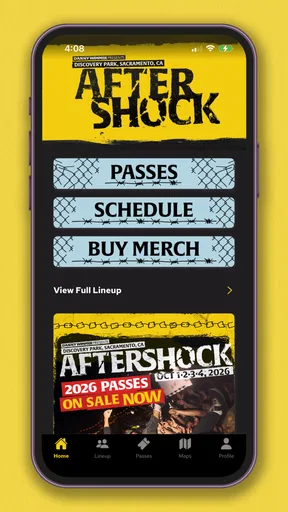
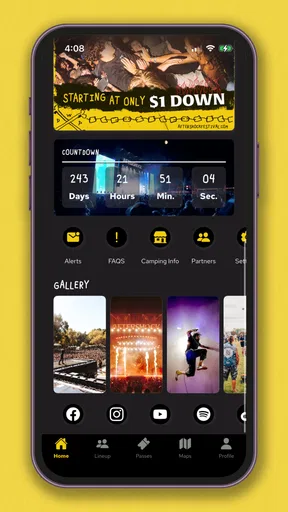
This is the official event app for Aftershock Music Festival, developed by Danny Wimmer Presents. It is a free events app with an Everyone content rating, and it runs on Android devices using version 10 or later. The current release is 16.0.1. Those details make it fairly easy to approach, especially if you want the official source rather than piecing together information from social media posts, screenshots, and general search results.
I would not describe it as a general music-discovery app or a replacement for a streaming service. Its job is narrower and more useful: helping an Aftershock attendee prepare, make decisions during the festival, and keep event information in one place. The question is whether that focused role earns permanent space on your phone after the novelty fades. For me, the answer is yes during the planning and festival period, but only conditionally afterward.
From opening-week excitement to a workable festival plan
I find the opening excitement most useful when I turn it into a simple plan rather than another round of browsing. This section looks at how I would sort out priorities, compare options with friends, and leave enough flexibility for the day to change. That practical starting point also makes it easier to judge what the app can—and cannot—do for different needs.
The first session is about reducing uncertainty
The strongest early appeal comes from having a dedicated place to begin organizing the experience. Before attending, I usually have several competing concerns: which performances matter most, how much walking or waiting I can tolerate, when to take breaks, and how to avoid spending the entire day reacting to the crowd. An official festival app gives those decisions a natural home instead of leaving them scattered across browser tabs and messages.
That is especially helpful for someone attending for the first time. A newcomer may know the artists they want to see but still struggle with the shape of the day. The app encourages a more deliberate approach: start with priorities, identify conflicts, and leave room for the unexpected. I found that this planning mindset is more valuable than simply browsing a list of performers. A schedule becomes useful only when it changes how you move through the event.
For returning attendees, the first-week appeal is different. You already understand the basic rhythm of a festival, so the app becomes a quick way to refresh your plans and check what has changed since your last visit. That makes it less of a discovery tool and more of a personal reference point. I appreciate that distinction because it prevents unrealistic expectations. It is not trying to replace the full festival experience; it helps you arrive with fewer avoidable decisions.
A realistic day with the app
Imagine meeting two friends before the first performance. One wants to stay near a favorite stage, another wants to catch a different act, and you are trying to preserve enough energy for the evening. Instead of agreeing to follow one person all day, you can use the festival information to build a loose plan with a few fixed priorities and flexible gaps. That gives the group a shared conversation: which performance is non-negotiable, which one is worth splitting up for, and where can everyone meet again?
That workflow is more realistic than attempting to create a perfect minute-by-minute itinerary. Festival conditions change. A group may move more slowly than expected, a performance may be more crowded than anticipated, or you may simply decide that a break matters more than another set. I recommend using the app to establish anchors rather than treating it as a strict timetable. The best plan is one that survives a change of mind.
A useful habit is to review the day before leaving for the venue, then check it again when you are calm rather than while walking through a crowd. I would note the few performances I absolutely want to see and remember the rest as optional. This reduces the temptation to keep reopening the app every few minutes, which is important when your phone battery, attention, and patience are all limited.
Where it beats ordinary alternatives
The usual alternatives are a mobile browser, screenshots shared by friends, social media, or a general calendar app. Each can work, but each creates a different kind of friction. A browser search may return old posts or incomplete context. A screenshot is quick but becomes awkward when plans change. Social platforms are useful for conversation but can bury practical information under unrelated updates. A calendar app is excellent for reminders yet poor at preserving the event-specific context around them.
The official app has a clear advantage because it is built around one festival rather than forcing you to assemble your own system. That saves time during the first planning session and makes it easier to return to the same source when you need a reminder. I also prefer it to relying on a friend’s screenshot because everyone can make decisions from the same event reference instead of debating whether a shared image is still current.
There is a trade-off, though. A dedicated event app is valuable precisely because it is narrow. If you want to compare Aftershock with other concerts, track an entire season, or manage tickets and personal appointments across multiple events, a general calendar or concert-management tool may be better. This app is a focused instrument, not a complete personal entertainment organizer.
Who gets the most from the first week
The best fit is someone who wants structure without turning a festival into a spreadsheet. It is also useful for groups, especially when friends have different priorities and need a common reference. Parents or first-time festival visitors may appreciate having event information gathered in a purpose-built place, while experienced concertgoers can use it as a fast refresher before heading out.
I would be less enthusiastic if you already have a reliable personal system and only plan to attend casually. If your approach is to arrive, wander, and follow whatever sounds good nearby, an official schedule app may feel like unnecessary preparation. It can still be handy, but it will not automatically improve an experience built around spontaneity.
What remains useful after the initial novelty
After the first burst of planning, I think the app works best as an occasional reference, not a daily destination. This section considers how I would keep its information useful without letting repeated checks or a rigid schedule take over. From there, it becomes clearer whether the app still earns a place on my phone once the festival is no longer the next thing on my calendar.
Month-to-month value depends on the festival calendar
Unlike a messaging app or music player, this is not something I expect to open every day. Its recurring value follows the event rather than my normal routine. During the period when I am thinking about Aftershock, the app can become a practical planning tool. Outside that period, its usefulness naturally drops. That is not a flaw in the same way it would be for a productivity app; it is a consequence of being an event-specific companion.
The important question is whether the app gives me a reason to return after the first enthusiastic session. For me, it does when I use it in stages. The first visit is for orientation. A later visit is for narrowing down priorities. Another check is for adjusting the plan as the event approaches. Finally, I use it as a quick reference during the festival itself. That staged workflow creates more lasting value than opening it once and expecting it to entertain me.
I would not keep it installed indefinitely solely because it is free. Free installation removes the financial barrier, but it does not remove the cost of storage, notifications, visual clutter, or forgotten apps. My approach would be to keep it through the planning and attendance period, then make a deliberate decision afterward. If I expect to attend again or want to stay close to future event planning, keeping it makes sense. If not, removing it is reasonable and does not diminish what it did well.
Using it as a planning habit rather than a novelty
The most effective long-term habit is a short weekly check during the active planning period, not constant browsing. I would look for the information that affects decisions, update my personal priorities, and then close the app. This prevents the common problem of confusing more screen time with better preparation.
Another useful technique is to separate “must see” performances from “nice if nearby” options. The app can support that distinction, but the judgment remains yours. A festival day is not improved by trying to attend everything. In practice, a smaller list often gives you more freedom to enjoy a surprise performance, find food, rest, or stay with friends without feeling that you have failed your itinerary.
For groups, I suggest agreeing on meeting principles before the event. Pick a few broad meeting points or time windows rather than expecting everyone to remain together. The app can help the group discuss the schedule, but it cannot solve the human problem of different energy levels and preferences. That is an important trade-off: centralized information improves coordination, yet it does not eliminate the need for communication outside the app.
Maintenance is light, but attention still matters
From a maintenance perspective, the app is easier to live with than a large general-purpose service. The current version is 16.0.1, and the minimum operating-system requirement is Android 10. That gives users a clear compatibility baseline. I would still keep the app updated before relying on it at the venue, because event information is time-sensitive and an outdated installation is a poor foundation for a busy day.
My practical advice is to open it before the event rather than waiting until you are standing in a dense crowd. Check that it launches properly, review the information you expect to need, and make sure your phone is prepared for a long day away from a charger. This is not a criticism unique to Aftershock Festival; it is simply the difference between testing a tool at home and discovering a problem when you are already under pressure.
There is also a maintenance cost in the broader sense: deciding whether the app deserves a permanent place on your device. Because it is free, the decision is mostly about relevance rather than budget. I would keep it if the festival remains part of my near-term plans. Otherwise, I would remove it after saving any personal notes I need elsewhere. A dedicated event app should earn its place through timely usefulness, not through habit alone.
Where fatigue can set in
The first source of fatigue is repetition. Once I know my preferred performances and the basic shape of the day, repeatedly reviewing the same event information adds little. The app can feel less like a useful companion and more like a reminder of an event that has not yet arrived. That is why I prefer scheduled check-ins over casual, repeated opening.
The second is the tension between planning and discovery. Detailed preparation helps avoid missed priorities, but too much planning can make a festival feel rigid. If I use the app as an authority that dictates every movement, I lose the freedom that makes a live event enjoyable. Its best role is advisory: it helps me understand the choices, while I remain free to ignore the plan.
A third source of fatigue is dependence on a single digital reference during a high-energy day. Even a well-designed official app cannot replace common sense, direct communication, or personal preparation. I would not make it my only memory aid. I prefer to know my key plans before arriving and use the app for confirmation rather than treating it as the sole source of my day’s decisions.
These limitations also explain why some users should skip it. If you dislike event planning, do not care about specific performances, or already have a dependable way to manage festival information, the extra installation may not offer enough benefit. Likewise, people looking for a year-round music community, personalized listening recommendations, or a broad concert archive should choose a different type of app.
How the rating fits my experience
The app holds a 4.2 average from over one hundred ratings, with several dozen written reviews. I read that as a positive but not definitive signal. It suggests that many users find the focused event purpose worthwhile, while the less-than-perfect score is a reminder that event apps are judged under demanding conditions. A small inconvenience feels larger when someone is rushing between performances, dealing with crowds, or trying to coordinate with friends.
Its reach is also meaningful without making it seem universal: it has passed ten thousand installs. That gives me more confidence that it is an established companion for its intended audience, but I would not interpret that as evidence that every music fan needs it. Relevance matters more than popularity here. Someone attending Aftershock can reasonably find value in it, while someone with no connection to the festival has little reason to keep it around.
Privacy, cost, and suitability in everyday decisions
The free price makes trying it straightforward, and the Everyone rating keeps its audience broad. I would still judge it by usefulness rather than assuming that free means frictionless. The real cost is the attention required to learn where the information is and decide how much of it belongs in your personal plan.
For a friend deciding whether to install it, my answer would be simple: if you are attending Aftershock or actively preparing for it, install it early enough to explore calmly. If you are only curious about the festival, a quick look may be enough, but I would not expect lasting value from keeping it open between events. The app earns its place through preparation, coordination, and timely reference—not through continuous entertainment.
My long-term verdict
After using it as an event companion, I see Aftershock Festival as a focused tool that succeeds when I give it a clear job. It helps turn a large music event into a set of manageable choices, and it is more dependable for that purpose than scattered screenshots or casual social posts. The strongest benefit is not novelty; it is the reduction of small planning decisions that can otherwise drain attention before the music even begins.
Its lasting value is naturally seasonal and situational. I would keep it during the active planning window, use it in short deliberate sessions, and rely on it as a flexible reference during the festival. I would not expect it to become a permanent daily habit, and I would not recommend it to someone seeking a broad music platform. That is an honest limitation, but also a sign that the app understands its role.
My final recommendation is for attendees who want to balance preparation with spontaneity. Use it to identify your anchors, coordinate with friends, and make the day easier to navigate. Do not let it dictate every hour, and do not keep it installed forever simply because it costs nothing. In the right window, it provides practical festival value without demanding a complicated maintenance routine; once that window closes, its usefulness should be judged honestly rather than assumed.
Verdict
Strengths of Aftershock Festival
- Strong lineup featuring major rock, metal, and alternative acts
- Multiple stages offer varied performances throughout the festival
- Festival app and schedule tools can simplify planning your day
- Energetic atmosphere appeals to dedicated rock music fans
- Food, merchandise, and activities add variety between performances
Limitations of Aftershock Festival
- Large crowds can make movement between stages slow
- Las Vegas heat may be uncomfortable during outdoor performances
- Popular acts often have overlapping set times
- Food, drinks, and merchandise can be expensive on-site
- Parking and transportation may require advance planning
Similar Picks in This Category
View All
Easy Quran Mp3 Audio Offline
Muslim Worldapp4.7

Invitation Maker: Cards & RSVP
Greetings Island4.9

StubHub - Live Event Tickets
StubHub4.3

Fever: Events & Tickets
Fever Labs4.7

Epic Freebie Games Radar
Arioch Pds - Apps & Games4.4

Invitation card Maker, Design
Splendid App Maker4.9
Frequently Asked Questions
What is Aftershock Festival?
Aftershock Festival is a major rock and heavy metal music festival held annually in Sacramento, California. It brings together well-known headliners, established bands, and emerging artists across multiple stages. The event is designed for fans who want several days of live performances, large festival production, food vendors, merchandise, and a lively community atmosphere centered around rock music.
Is there an official Aftershock Festival app?
The official Aftershock Festival app is generally intended to help attendees organize their visit. Depending on the edition, it may include the lineup, stage schedules, interactive maps, festival news, set-time alerts, and practical information. Features can change from year to year, so users should check the current app listing and official festival announcements before downloading or relying on it.
Can I use the app to create a personal festival schedule?
In most versions, the Aftershock Festival app allows users to browse performances and save favorite artists or events to a personalized schedule. This is useful when several bands play at overlapping times on different stages. However, schedules may change because of production issues, weather, or artist circumstances, so it is still wise to check in-app updates and announcements during the festival.
Does the Aftershock Festival app provide venue maps and practical information?
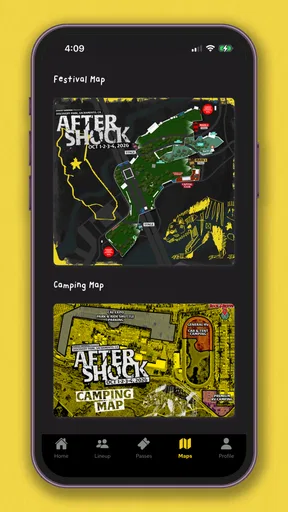
The app may provide a festival map showing stages, entrances, food and drink areas, merchandise stands, restrooms, medical services, and other important locations. It can also include rules, transportation guidance, accessibility details, and frequently updated notices. Availability varies by festival year, and visitors should review the official website for the most current policies before attending.
Is the Aftershock Festival app free, and is it necessary to attend?
The official festival app is typically free to download, although mobile data may be required for certain features and notifications. It is not usually mandatory for entry, since tickets and identification requirements are handled separately. Nevertheless, installing it can make the experience easier by providing schedules, alerts, maps, and last-minute updates in one convenient place.
